6 Things You Can Do with Azure AI Speech
A new Azure AI Speech course is now available!
Learn everything from the fundamentals of Azure AI Speech to practical Speech-to-Text and Text-to-Speech implementations, all in just 40 minutes.
If you’re interested in AI-powered speech services, you may have heard of Azure AI Speech.
Azure AI Speech is Microsoft’s speech AI service available on Azure and is also offered as one of the Foundry Tools in Microsoft Foundry. It provides a wide range of speech processing capabilities, including Speech-to-Text, which converts spoken audio into text, and Text-to-Speech, which transforms text into natural-sounding speech. Additional features include speech translation, pronunciation assessment, and more.
In this article, I’ll introduce six Azure AI Speech features that I personally find particularly useful.
1. Speech to Text / Text to Speech
Two of the most representative features of Azure AI Speech are Speech to Text and Text to Speech.
With Speech to Text, you can convert recorded audio into text. It can be used for a variety of purposes, such as creating meeting minutes and transcribing audio data.
On the other hand, Text to Speech converts input text into natural-sounding speech. It can be used for applications such as creating narration and building voice assistants.
With Azure AI Speech, these two fundamental speech processing capabilities can be used relatively easily.
2. Improve Speech to Text Accuracy with Phrase Lists
With Speech to Text, audio containing technical terms or proper nouns may sometimes be incorrectly recognized and converted into text. This is not unique to Azure AI Speech and can occur with many Speech to Text services.
In such cases, Phrase List can be useful.
By specifying words or phrases that you want the service to recognize in advance, you can get more accurate recognition results when those words appear in the audio.
For example, Phrase List is useful when working with product names, company names, project names, technical terms, or other words that may not be included in a general vocabulary.
If you want to improve Speech to Text recognition accuracy, Phrase List is definitely a feature worth trying.
The use of Phrase Lists is also covered in this course.
3. Choose a Voice from the Voice Gallery for Text to Speech
In Text to Speech, the voice used to read the text is also important.
Azure AI Speech provides a Voice Gallery where you can explore a variety of voices.
In the Voice Gallery, you can easily preview different voices and compare them to find one that best suits your needs.
Once you find a voice you like, you can specify that voice when using Text to Speech.
This is especially useful when you want to listen to different voices before choosing one.
The use of Voice Gallery is also covered in this course.
4. Azure AI Speech with Docker Without Writing Code
Azure AI Speech can be easily run using a container image that comes with the Azure AI Speech CLI (spx) pre-installed.
With this approach, you can use Azure AI Speech without individually installing the required packages or writing any code in your local environment.
For example, you can start the container locally and use Azure AI Speech by accessing the Azure Speech Service over the internet, as shown below.
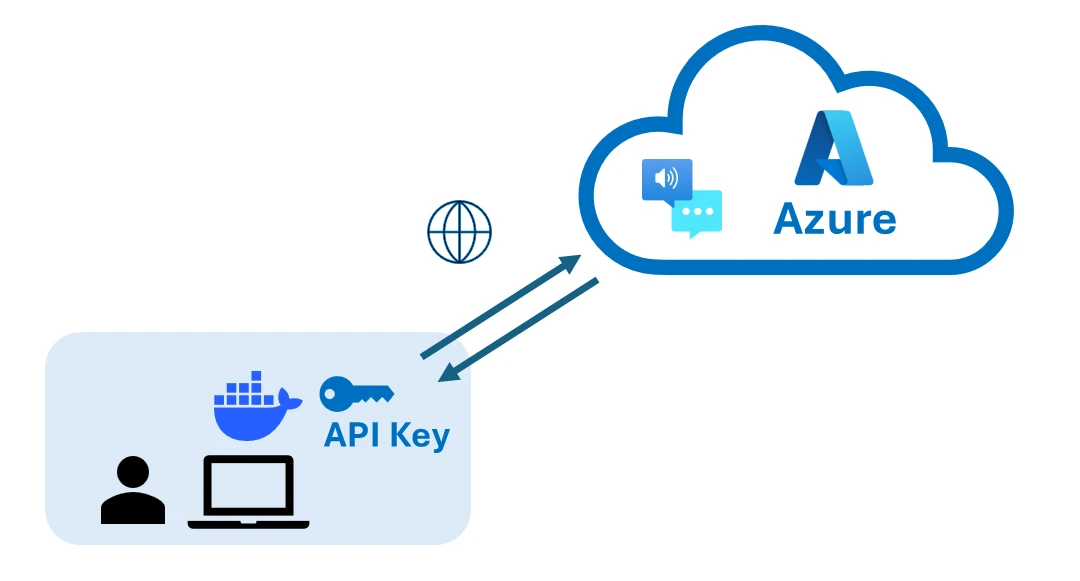
Since it uses a CLI, you can easily try speech conversion and other features simply by running commands.
Another advantage is that, as a containerized application, it is easier to maintain a consistent environment. In addition, if you are considering deploying Azure AI Speech in a container orchestration environment such as OpenShift or Kubernetes, using a container makes it easier to integrate into these environments.
The use of Azure AI Speech containers is also covered in this course.
5. Translate Speech with Speech Translation
Azure AI Speech also provides a speech translation feature called Speech Translation.
It allows you to translate spoken audio into another language.
For example, you can translate spoken English into Spanish.
Instead of simply performing speech recognition, Speech Translation can handle the following process:
Speech
  ↓
Speech to Text
  ↓
Translation
  ↓
Translated Text
This makes it useful for applications that need to support multiple languages.
6. Evaluate Pronunciation with Pronunciation Assessment
Pronunciation Assessment can be useful for foreign language learning.
It analyzes a user’s spoken audio and evaluates how accurately the words were pronounced.
Rather than simply recognizing what was said, it can assess aspects such as pronunciation accuracy, making it useful for language-learning applications and pronunciation training.
For example, users can read a passage in a foreign language aloud and have their pronunciation evaluated.
This allows Azure AI Speech to go beyond simple speech-to-text transcription and evaluate the spoken language itself.
Conclusion
This article introduced six particularly useful features available with Azure AI Speech.
| # | Feature | What it does |
|---|---|---|
| 1 | Speech to Text / Text to Speech | Convert between speech and text |
| 2 | Phrase List | Improve recognition of specific words and phrases |
| 3 | Voice Gallery | Preview voices and use them for Text to Speech |
| 4 | Docker | Easily perform speech processing using the CLI |
| 5 | Speech Translation | Translate speech into another language |
| 6 | Pronunciation Assessment | Evaluate pronunciation |
Azure AI Speech is more than just a service for speech-to-text transcription and text-to-speech conversion.
It can be used for a wide range of speech-related applications, including accurate speech recognition, translation, and pronunciation assessment.
It is also available as one of the Foundry Tools in Microsoft Foundry, making it a convenient option when building AI-powered applications on Azure that require speech capabilities.
If you are new to Azure AI Speech, starting with Speech to Text and Text to Speech is a good way to get familiar with what the service can do.
For Those Who Want to Learn Azure AI Speech
This article introduced six useful features available in Azure AI Speech.
Among them, Speech to Text, Text to Speech, Phrase List, Voice Gallery, and how to use Azure AI Speech with Docker are covered in detail in the online course below.
In about 40 minutes, you can learn the basics of Azure AI Speech, as well as how to use Speech to Text and Text to Speech. If you are new to Azure AI Speech or want to learn more, check out the course below.